
On a Samsung Galaxy phone of my friend, I found DECO PIC under Camera settings, and the fun fact is he was also unaware of it despite being a Samsung user himself. It has various options like GIFs, Masks, Frames, and Stamps for photos and videos.
However, when we tried it for a while, I figured out that he was not getting much interest in it, and then it also clicked what to do if I had to get rid of it. By the way, I figured it out, but possibly there can be some of you who are also confused about whether to keep it or delete it.
So, if you’ve recently noticed DECO PIC on your Samsung phone and wondered what it is, I’ll break it down in this guide, including what it does, why it appears on your phone, how to use it, and whether you can disable it.
What Is the DECO PIC Feature in Samsung Camera?
DECO PIC is a Samsung phone’s camera feature designed for creating fun and creative photos and videos.
It adds live visual effects to the camera so you can see them while taking a picture or recording a video. Instead of taking a normal photo and editing it afterward, you can choose an effect first and see how it looks on the screen.
Here, let me show the picture of my friend that I was talking about 😂:

Depending on your Galaxy phone and software version, DECO PIC may appear as its own shortcut or as part of the AR Zone section inside the Camera app.
Why Did DECO PIC Appear on My Samsung Phone? Don't Get Confused
This is probably the question that brings most people here.
Samsung explains that DECO PIC may appear as a new shortcut on a Galaxy phone, especially after a software update. The company says the feature was already available as part of the phone’s camera tools, but many users were not aware of it.
The shortcut was added so users could access these creative camera features more easily.
So, if you suddenly see DECO PIC on your phone, it does not mean that a random third-party app has been installed without your knowledge.
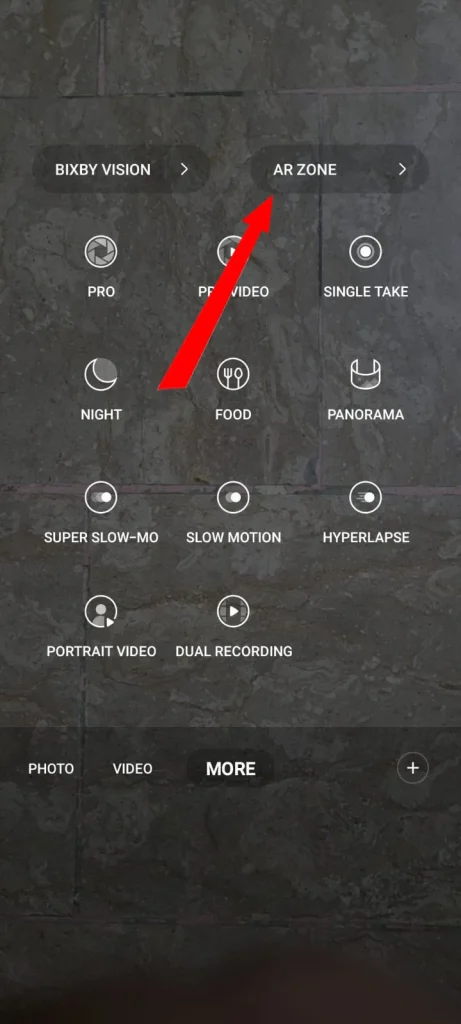
Samsung identifies this feature as an official feature. It can also be accessed through Camera > More > AR Zone on supported Galaxy devices.
Is DECO PIC Safe to Use?
Yes, DECO PIC is safe to use. It is an official Samsung feature and is not malware or a virus.
The DECO PIC shortcut is not malware. It is connected to the creative camera tools already available on supported Galaxy phones. Because DECO PIC works with the camera, it needs a few permissions to perform its functions.
Samsung lists these permissions:
- Camera: To apply graphics and effects to photos and videos.
- Audio: To record sound when recording videos.
- Storage: To save recorded pictures.
You may be asked to allow these permissions the first time you use the feature.
These permissions make sense for a camera tool because DECO PIC needs access to the camera to apply effects and access to audio when you record videos with sound.
What Does DECO PIC Do to Create Funful Pictures?
The main purpose of DECO PIC is to make photos and videos more playful without requiring another editing app. You can use it to add:
- Stickers to your photos
- Masks and face effects
- Frames around pictures
- GIFs and stamps
- Filters and other live effects
You can select an effect and preview it directly through the camera before taking the picture.
Some effects are designed to follow your face or appear over specific parts of the camera view, which makes them useful for quick social media photos and videos.
It is not meant to replace a professional photo editor. It is simply a quick way to add creative effects while you are using the camera.
Where Can You Find DECO PIC on Samsung Mobile?
On some phones, you may see a DECO PIC icon directly on your screen. On supported devices, you can also try:
- Open the Camera app.
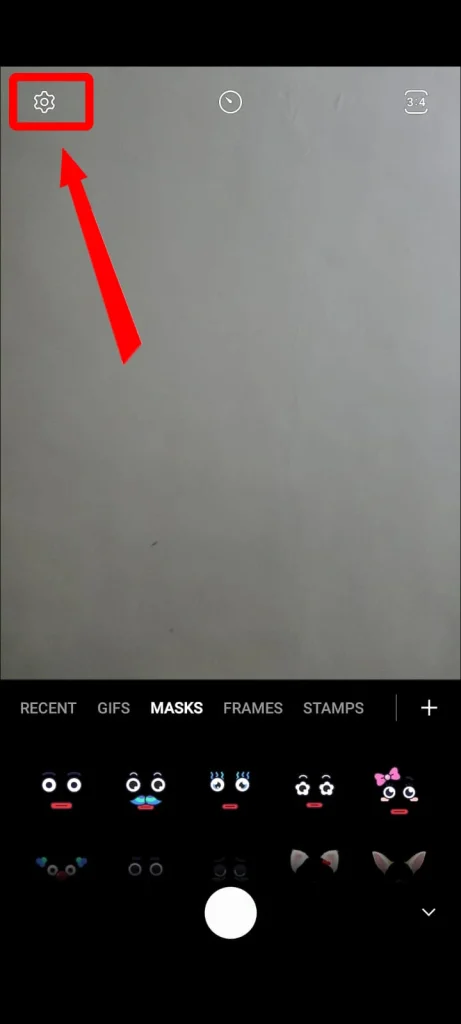
- Tap AR ZONE.
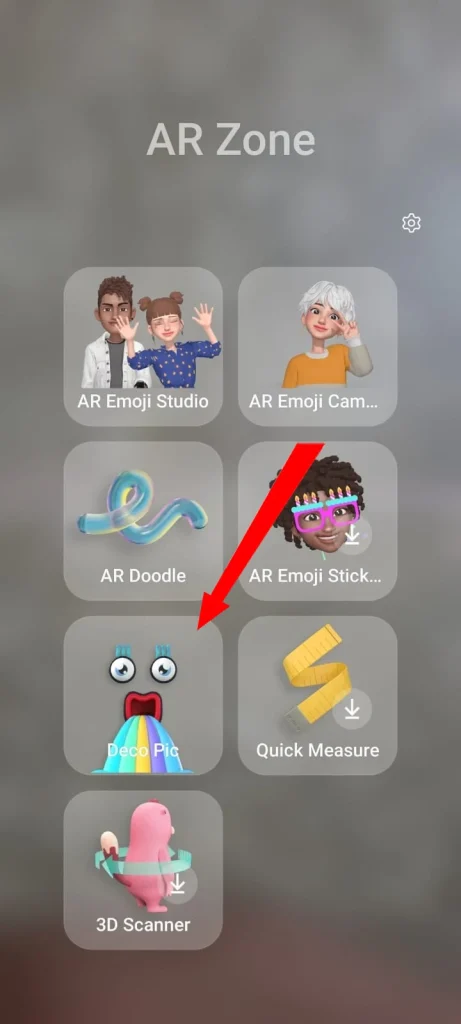
- Choose Deco Pic
After that, just simply enjoy using the fun frames, masks, or whatever you get interested in. However, in some cases, if it is not downloaded, you may have to download it first, as I did.
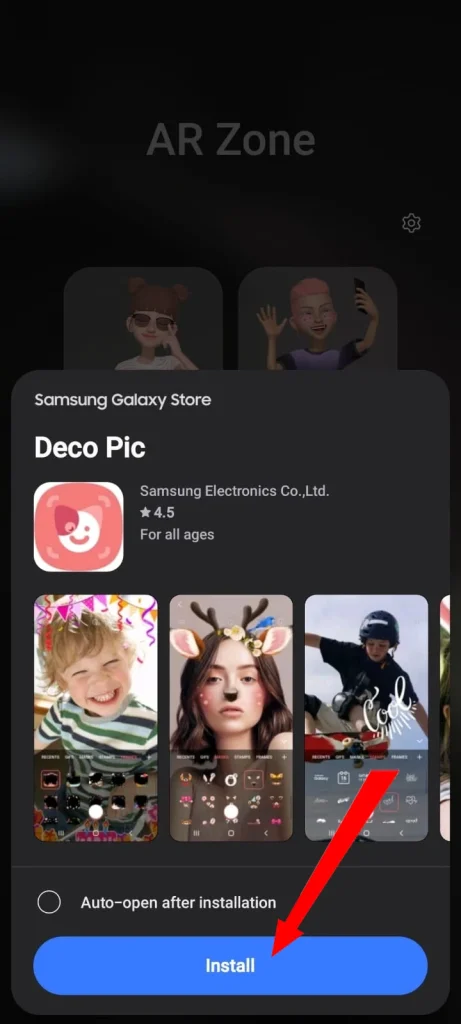
The exact layout can vary depending on your Galaxy model and software version, so don’t worry if the menus look slightly different on your phone.
Can You Uninstall or Disable DECO PIC?
You may not be able to completely uninstall DECO PIC from every Samsung phone, whether it is a Samsung S24, S26, or an older one, because it can be connected to the built-in Camera experience.
However, Samsung provides an option to disable DECO PIC and remove its shortcut if you don’t want to use it.
Samsung actually recommends keeping the feature enabled because it is part of the Camera app, but disabling it is possible.
How to Disable DECO PIC
If DECO PIC appears as a shortcut on your phone, Samsung’s documented method is simple:
- Find the DECO PIC shortcut on your screen.
- Tap and hold the icon.
- Select Disable.
- Tap Disable again to confirm.
The DECO PIC shortcut will then disappear from your phone. If you change your mind later, you can bring it back by going to:
Settings > Apps > DECO PIC > Enable
The shortcut can then appear on your phone again.
What People Also Ask About Deco Pic App
Do I need the DECO PIC app?
Not necessarily, it’s optional. If you don’t use fun photo effects, you can safely delete it.
Is DECO PIC a free app?
Yes, DECO PIC is free to use.
Is DECO PIC a Virus?
No. DECO PIC is an official Samsung feature, not a virus or malware. Samsung specifically confirms that the shortcut is not malware.
Does DECO PIC Work on other Android Phones?
DECO PIC is designed specifically for Samsung Galaxy devices, rather than Android phones in general. Its availability and location can vary depending on the Galaxy model and software version.
Final Thoughts: Should You Keep or Remove DECO PIC?
DECO PIC is simply Samsung’s built-in creative camera feature for adding fun. It does nothing more than add stickers, masks, frames, GIFs, stamps, and other visual effects while you use the camera.
So, if DECO PIC suddenly appeared on your Samsung phone, there is no need to worry. It is an official Samsung feature, not malware.
And if you don’t use it, you don’t have to keep the shortcut on your screen. The choice is completely yours. You can disable DECO PIC and bring it back later through your phone’s app settings.