
One-page websites have become a popular design choice for businesses and brands to strengthen their online presence as they offer a sleek, streamlined user experience. These sites are especially appealing for brands with a single product, service, or key message.
However, while one-page websites can be visually stunning and user-friendly, they also present unique challenges when it comes to Search Engine Optimization (SEO). That’s why I’ve prepared a complete SEO guide for a Single-Page website with an experience of over fourteen years.
This comprehensive guide explores effective one-page website SEO techniques that can help you outrank competitors. It also highlights the gaps in existing SEO resources and provides actionable tips for improving your site’s search engine visibility.
What is a One-Page Website?
A one-page website, sometimes referred to as a single-page site, consolidates all of a site’s content into a single scrollable page.
Instead of navigating to multiple pages, users interact with anchor links or scroll to access different sections like About, Services, Portfolio, or Contact. One-page websites are ideal for:
- Product launches
- Personal portfolios
- Event promotions
- Businesses with a singular service offering.
Unlike multi-page websites, one-page websites provide a linear flow, which guides users through your content in a predetermined sequence. This makes them highly suitable for storytelling and conversion-focused experiences.
Pros and Cons of One-Page Websites for SEO
Before I walk you through the optimization techniques, I feel it’s important to tell you the strengths and weaknesses of one-page sites.
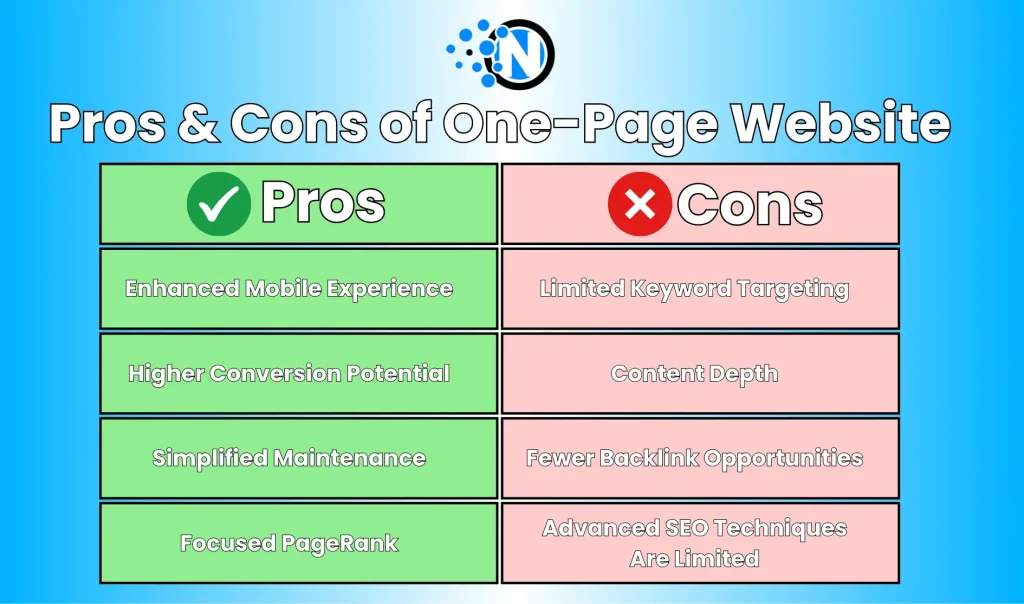
Pros:
- Enhanced Mobile Experience: One-page websites are often responsive by default, which allows you to seamlessly scroll and navigate on smartphones and tablets. Google’s mobile-first indexing prioritizes mobile-optimized sites, which is an SEO advantage.
- Higher Conversion Potential: Consolidating all content into a single page can lead users through a clear, uninterrupted conversion funnel, from awareness to purchase or inquiry.
- Simplified Maintenance: Managing one page is faster and cheaper than maintaining multiple pages. Updates and design changes are applied globally.
- Focused PageRank: Backlinks earned are concentrated on a single URL, maximizing domain authority and link equity for that page.
Cons:
- Limited Keyword Targeting: Targeting multiple keyword clusters with only one page is challenging. Keyword diversity is restricted, which may limit organic reach.
- Content Depth: It is difficult to cover a variety of topics in detail, which can reduce trust and topical authority.
- Fewer Backlink Opportunities: One-page sites typically include less informational content, which makes it harder to attract external links.
- Advanced SEO Techniques Are Limited: Strategies like content siloing, internal linking, and topic segmentation are less effective on a single-page layout.
Keyword Strategy for One Page SEO
SEO for one-page websites requires meticulous keyword planning. Because all content exists on a single URL, each section must be strategically optimized to target specific search intents.
Step 1: Research and Select Keywords
- Identify primary keywords that are highly relevant to your product or service.
- Include secondary and long-tail keywords to capture additional search traffic without diluting the main focus.
Step 2: Map Keywords to Content Sections
You need to divide your one-page site into distinct sections, each optimized for a cluster of related keywords.
Example:
- Services Section: “Professional Web Design Services.”
- Portfolio Section: “Best Web Design Projects.”
- Blog/Resource Section: “Web Design Tips and Tutorials.”
Step 3: Use Semantic Keywords
- Include related phrases and synonyms naturally within each section to increase relevance and support semantic search.
- Google’s RankBrain algorithm rewards contextually rich content rather than repeated keyword stuffing.
“Many one-page SEO guides focus only on basic keyword placement and fail to cover thematic segmentation. Using <a href="https://www.nogentech.org/keyword-clustering/" target="_blank" rel="noreferrer noopener">semantic keyword clusters</a> within a single-page design is a powerful strategy that can improve search relevance without creating multiple pages!”
–Fawad Malik, CEO at WebTech Solutions
How to Structure Your One-Page Website for SEO
Proper structure is crucial for both search engines and users because a messy layout can reduce dwell time, hurt rankings, and frustrate visitors as well.
1. Create Clear Content Sections
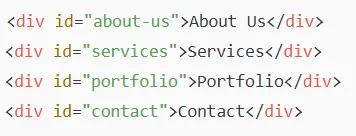
First, you must use <div> tags or sections to separate content for crawlers and visual clarity.
Example structure:
- About Us
- Services
- Portfolio
- Contact
2. Use Heading Tags Strategically
- Apply one H1 tag per section to indicate the main focus of that section.
- Use H2 and H3 tags to break down content hierarchically, which helps readability and accessibility.
3. Optimize Anchor Links
Anchor links are critical for navigation and SEO. Ensure they include keyword-rich IDs for improved relevance.
Example:

4. Maintain a Logical Flow
- Organize content from awareness to consideration to conversion.
- Keep CTAs prominent and ensure each section contributes toward your primary conversion goal.
On-Page SEO Best Practices for a Single-Page Site
No matter if you are running a single-page website or a multi-page website, it’s essential for you to adhere to on-page SEO best practices.
1. Meta Titles and Descriptions
- Include your primary keywords in your meta title and description.
- Since there’s only one page, ensure these elements appeal to multiple search intents.
2. Image Optimization
- Compress images and use next-gen formats like WebP.
- Add descriptive alt text containing target keywords.
- Use a CDN to improve load speed.
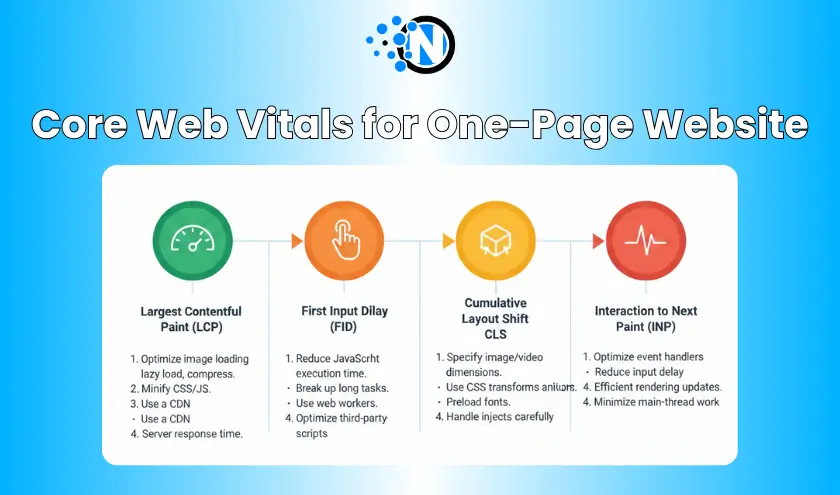
3. Page Speed and Core Web Vitals
- Optimize Largest Contentful Paint (LCP), Cumulative Layout Shift (CLS), and Interaction to Next Paint (INP).
- Implement lazy-loading for below-the-fold content to reduce initial load time.
👉 Pro Tip: Integrating schema markup for your products, events, or services can boost your visibility to massive organic traffic.
Link Building for One-Page Websites
Single-page websites face a unique challenge when it comes to link building: you have fewer URLs to promote, fewer content assets to earn natural backlinks from, and limited topical depth.
However, this does not mean you can’t build a strong backlink profile. It simply requires a more intentional and creative strategy.
1. Expert Roundups (High-Authority Backlinks Through Expertise)
Expert roundups are one of the most effective ways to gain backlinks, regardless of your website size. This involves being featured as a contributor or thought leader in articles curated by industry publishers.
How it helps one-page sites:
Since you don’t have multiple content resources to show expertise, your personal input becomes the content. Your name, brand, and website get linked as a credit source.
How to do it:
- Search for roundup opportunities using Google queries like:
- “expert roundup + your niche”
- “industry tips + roundups”
- “experts share + [topic].”
- Pitch a short, high-value answer that sets you apart.
- Provide a unique data point, personal experience, or insight (editors love originality).
- Ask politely for credit and a backlink.
Example:
If your site is about web design services, contribute insights like: “In 2025, micro-interactions and AI-driven accessibility checks are transforming homepage UX design.” The publication will link to your site as your attribution link.
2. HARO (Help A Reporter Out): High-Authority Press Mentions
HARO is one of the fastest ways to earn backlinks from Forbes, Business Insider, DZone, and other major websites.
Why it works for one-page sites:
Journalists don’t care about how many URLs your website has. They care about valuable quotes and expertise. Even a single-page website can get multiple high-authority mentions through HARO.
How to use HARO effectively:
- Sign up for HARO or alternatives like Qwoted, SourceBottle, and Terkel.
- Check daily journalist requests in your niche.
- Respond within 20 minutes because speed matters.
- Provide:
- A short introduction
- A strong quote (2–4 sentences)
- A link to your website
👉 Pro Tip: Create a reusable “expert bio” template to send quickly. The faster you respond, the higher the chance of being published.
3. Unlinked Brand Mentions (Easy Wins Most People Ignore)
Sometimes blogs, forums, or social posts mention your brand or product but forget to include a link. You can easily convert these mentions into backlinks by reaching out.
Why this works well for one-page websites:
You don’t need multiple URLs; any backlink will boost the authority of your primary URL.
How to find unlinked mentions:
- Use tools like Ahrefs Alerts, Google Alerts, and Mention.
- Search for your brand, your name, or your product name.
- Identify mentions without links.
- Reach out with a polite message: “Thanks for featuring us in your article! It would be great if you could add a link to our website so readers can learn more.”
Success Rate:
Success rates are very high because the website already talked about you; adding a link is usually a small and easy update for them.
4. Content Partnerships (Mutual Value, Long-Term Authority)
Content partnerships allow you to position your one-page website as a valuable resource without needing multiple blog posts or service pages.
Types of partnership opportunities:
- Industry newsletters
- YouTube channel collaborations
- Podcast guest appearances
- “Recommended Tools” pages on other websites
- Listicles featuring your niche (e.g., “Top 10 Personal Portfolio Websites”)
How to use this:
- Offer value: maybe a testimonial, product demo, expert comment, or a case study.
- Ask for placement in relevant content pieces or resource pages.
- Collaborate on cross-promotional content where your one-page website is referenced.
Example:
If you run a one-page website offering SEO audits, partner with a digital marketing blog to create: “6 Tools to Improve Small Business SEO” and get your site listed as a resource.
Analytics and Tracking for One-Page Sites
Tracking the performance of a one-page website is more challenging than monitoring a traditional multi-page site. Instead of users navigating through different URLs, all behavior happens on a single page, meaning metrics like pageviews, bounce rate, session duration, and navigation flow behave differently.
To get accurate and actionable insights, you must configure your analytics tools intentionally. Below are expanded techniques every one-page website owner should use:
1. Track URL Fragments (Anchor Tags) as Virtual Pageviews
On a one-page site, users navigate through anchor links such as:
yoursite.com/#aboutyoursite.com/#servicesyoursite.com/#pricing
However, Google Analytics does not automatically track these anchor movements as separate pageviews. This means you lose visibility into which sections users actually visit.
How to fix this:
Set up virtual pageviews in GA4 or Google Tag Manager so each anchor section counts as a pageview.
Example tracking setup:
- When a user clicks on
#services, record it as:/virtual/services
- When a user scrolls into the
#pricingsection, record it as:/virtual/pricing
Why this matters:
- You can see which sections are most visited.
- You can track drop-off points more accurately.
- You can measure section-level engagement (like a multi-page site).
Practical Insight:
If your analytics show most users never reach the “Contact” section, you need to reposition your CTAs or reduce content length.
2. Use Heatmaps and Scroll Maps to Analyze Behavior
While Google Analytics 4 shows numbers, heatmaps show exact user behavior visually. These tools reveal:
- Where users click
- How far they scroll
- Which elements get ignored
- Which sections get the most attention
Recommended tools:
- Hotjar (most popular)
- Crazy Egg
- Microsoft Clarity (free and powerful)
What to analyze:
- Scroll Depth
- See how far an average user scrolls:
If 70% of users never reach 50% of the page, then shorten the page or reposition key content.
- Click Heatmaps
- Spot which buttons or anchor links people use.
If a CTA button gets almost zero clicks, change its placement, color, or text.
- Rage Clicks/Dead Clicks
- These show frustration points.
Example: Users click on a non-clickable graphic, assuming it’s a button; this signals a UX improvement opportunity.
- Movement Heatmaps
- Shows where the cursor lingers.
Useful for identifying areas of interest or confusion.
3. Monitor Conversion Metrics Deeply
Since there is only one page, conversion tracking becomes even more important. You should track:
A. Form Submissions
Whether it’s:
- Contact form
- Booking form
- Lead capture form
- Consultation request
Create a GA4 conversion event for every form completion.
B. CTA Button Clicks
Track every major CTA:
- “Get Quote”
- “Buy Now”
- “Contact Us”
- “Download Guide”
- “Book a Demo”
These clicks tell you whether users are willing to take action. However, be careful with how you direct these clicks on mobile. Let me tell you that relying on standard links can hurt mobile app conversions by fracturing the data funnel and interrupting the user flow before the event triggers.
C. Time Spent on Important Sections
Instead of the overall session duration, track time spent between virtual pageviews. Example:
- Users spend 32 seconds on “Services.”
- Users spend 5 seconds on “Pricing.”
This data tells you whether your content persuades or loses interest.
D. Scroll-triggered Events
Trigger events when users reach important sections like:
- Testimonials
- Pricing tables
- Portfolio samples
- FAQ
This helps you identify what truly gets attention.
4. Behavior Flow Analysis for One-Page Websites
Even though one-page sites don’t have multiple URLs, you can simulate a behavior flow using virtual pageviews. This allows you to identify patterns like:
- Which section do visitors see first (besides the hero)?
- The order in which visitors consume content.
- At which section do users drop off most frequently?
- How many users reach the bottom of your page?
Example Insight:
If users move from Hero to Services to Pricing and Exit, then you should place a strong CTA after your Pricing section.
5. A/B Test Individual Sections
Since you can’t A/B test pages, you test sections instead.
Test elements such as:
- CTA text (“Get Started” vs. “Book a Free Call”)
- CTA placement (mid-page vs. bottom)
- Pricing table design
- Testimonials layout
- Hero section copy
Tools like Google Optimize (before sunset) or VWO allow A/B testing on a one-page site by targeting specific elements.
👉 Pro Tip: Test your first 300 words aggressively because this area determines whether users scroll or exit your website.
6. Track Performance of Anchor Links
Anchor links act like internal navigation. Tracking them reveals:
- Which sections do users care about most?
- Which links get ignored
- Which sections do readers want to skip to immediately?
Set up a GA4 event for every anchor link click:
menu_about_clickmenu_services_clickmenu_pricing_click
This helps you optimize navigation and understand user intent.
Advanced SEO Tips for a One-Page Site
Once you’ve optimized the core structure and content of your one-page website, implementing advanced SEO techniques can give you an extra competitive edge. These techniques help to maximize speed, boost usability, and maintain long-term rankings.
Below is an expanded breakdown of the three critical advanced strategies every one-page website should apply:
1. Lazy Loading for Faster Performance
One-page websites tend to carry heavier content because everything, like images, videos, scripts, animations, testimonials, forms, loads on a single URL. Without optimization, this can severely slow down the page, hurting both rankings and user experience.
Lazy loading solves this problem by loading content only when it is needed.
Why Lazy Loading is Critical:
- Improves Largest Contentful Paint (LCP)
- Reduces initial page load times dramatically
- Lowers bounce rates for mobile and slow internet users
- Helps your site score higher in Core Web Vitals
What to Lazy Load:
- Images below the fold
- Embedded YouTube videos (replace with lightweight thumbnail previews)
- Background images
- Testimonials or sliders
- Third-party scripts (chat widgets, analytics widgets, etc.)
How to Implement Lazy Loading:
You can use simple HTML attributes like:

Or use JavaScript libraries like:
- Lozad.js
- LazyLoad
- Intersection Observer API
👉 Pro Tip: Use LQIP (Low Quality Image Placeholder) or blur-up images to create a smooth loading effect. Visitors perceive the page as faster, improving UX and engagement.
2. Internal Linking via Anchors (Simulating a Multi-Page Structure)
Although one-page websites lack traditional internal links, you can replicate the effect using anchor-based navigation. Anchor links serve two purposes:
- They guide users smoothly through long content sections
- They help search engines understand the structure and hierarchy of your content
SEO Benefits of Anchor Links:
- Act like internal links, improving crawlability
- Help distribute link equity across sections
- Allow you to optimize each anchor for a specific keyword intent
- Reduce bounce rate by encouraging deeper navigation
3. Content Refresh (Keeping Your One-Page Site Relevant)
One-page websites can easily become stale because all your content lives on a single URL. Google values freshness, especially for competitive niches. Updating portions of your one-page site regularly signals to Google that your content remains relevant and worth ranking.
What to Refresh Regularly:
- Statistics (update to current year)
- Pricing tables
- Testimonials
- Portfolio samples
- Process explanations
- FAQ section
- Visuals, screenshots, or UI previews
Signs That Your One-Page Site Needs a Refresh:
- Traffic has dropped over the last 3–6 months
- Your competitors rank higher for similar intent keywords
- Your bounce rate increases
- Your content is no longer current
- Outdated year references (e.g., “Best in 2020”)
How to Refresh Without Rewriting the Entire Page:
1. Update Your Hero Section
Your hero is your biggest influence on conversions. Refresh:
- The headline
- The call-to-action
- The background image
- USP (Unique Selling Proposition)
2. Add New Testimonials or Case Studies
This adds fresh content and enhances trust signals.
3. Update Visual Infographics
Google’s image search rewards fresh visuals.
4. Expand Key Sections
Add a new FAQ, update features, or enhance service descriptions.
5. Add Seasonal or Trending Elements
Example: If you offer services, include sections like “2025 SEO Strategies We Use” to keep your page timely.
6. Re-optimize Keywords Annually
Search trends have changed, so adjust your keyword focus accordingly.
One-Page vs Multi-Page Websites: SEO Comparison
| Feature | One-Page Website | Multi-Page Website |
|---|---|---|
| Keyword Targeting | Limited | Extensive |
| Content Depth | Moderate | High |
| Backlink Potential | Lower | Higher |
| Page Speed | Can be Fast | Depends on number of pages |
| User Experience | Linear, Mobile-Friendly | Flexible, Easy Navigation |
| Advanced SEO Techniques | Restricted | Fully Applicable |
Final Thoughts on One-Page Website SEO
A one-page website can be an effective tool for small businesses, startups, or brand launches if executed correctly. While SEO limitations exist, a carefully optimized one-page site can still rank competitively by optimizing it for search engines.
By filling the gaps left by others, you can create a one-page website that is not only visually appealing but also SEO-friendly. Do you want us to help? Get in touch with us to get NogenTech’s services to improve your online visibility and search ranking.




Hi Noman,
I like the fact that you stressed the need to create quality content. I totally agree with you because some marketing does not care much about that. Their main goal is to publish content regularly, and in doing so, they miss the concept that quality prevails over quantity. Keyword research is also a great way to optimize. If you cannot research and find the right keywords for your posts, you will definitely kill your marketing effort. All other tips are incredibly amazing.
Thank you for sharing.